Screen Studio alternatives in 2026: the polish, priced differently
Screen Studio earned its reputation: it made screen recordings look like someone edited them. But as of September 2026 it is subscription only, $29 a month or $9 a month billed yearly, and macOS only. We build Drishti Studio, the native alternative that does the same job with a $79 lifetime option, so we have an obvious horse in this race. This update also looks past pricing into the three places people ask if Drishti actually matches the polish: camera layouts, camera backgrounds, and the mask tool. Every price and feature claim below was checked against official pages, most recently on September 13, 2026, and the last section lists where Screen Studio genuinely remains the better buy.
The short answer
Want the Screen Studio look without the renewal? That is Drishti Studio in one sentence: auto-zoom and smooth pans generated from your clicks, a side-by-side camera layout and an in-app background picker Screen Studio does not have, a pixelate mask on top of blur and highlight, karaoke captions that highlight each word, native instead of Electron, $79 once. Record the same demo in both and compare the results.
Why people go looking
- The meter: $9 a month billed yearly is $108 every year, forever, for one Mac app
- No Windows version, so mixed teams cannot standardize on it
- No automatic karaoke captions, which social clips increasingly expect
- It is an Electron app of roughly 365 MB, and long exports feel that overhead
- The camera is a fullscreen toggle or a corner bubble, no side-by-side column, and background blur borrows a macOS system setting instead of living in the app
Our pick: Drishti Studio, same job, native app, price that ends
Drishti Studio is built for the same outcome as Screen Studio: recordings that look professionally edited without post-production. Auto-zoom detects your clicks and Smart Animate generates the zoom keyframes for you, while smart pan follows the cursor with cinematic easing. The difference is under the hood, on the receipt, and in a few places Screen Studio has not built yet: native Swift with Metal GPU rendering instead of Electron, under 30 MB instead of roughly 365 MB, fast on 20-30+ minute exports, and yours for $79 once.
| Drishti | Screen Studio | |
|---|---|---|
| Architecture | Native Swift, under 30 MB | Electron, ~365 MB |
| Karaoke-style auto captions | ||
| One-click 9:16 social export | ||
| Side-by-side camera layout | Fullscreen or hide only, no side column | |
| Camera background picker | Blur, transparent, 7 presets, or custom image | Relies on macOS Portrait Mode |
| Mask styles | Blur, Pixelate, or Highlight | Blur mask, plus highlight |
| Platform | macOS | macOS |
| Pricing (September 2026) | $79 lifetime, $49/yr, or $9/mo | $29/mo, or $9/mo billed yearly |
Screen Studio is a trademark of its respective owner. Comparison based on publicly listed features.
The honest catches: Drishti requires macOS 15 or later, and it has no cloud share links, so you send the exported file yourself. The 14-day trial runs the core features, with a watermark on exports. Do the math against the meter: at Screen Studio’s $9 a month yearly billing, Drishti’s $79 Lifetime pays for itself before month nine, and everything after that is free.
Camera layouts: a side column, not a toggle
Screen Studio’s Dynamic Camera Layouts feature lets you set the selfie camera to fullscreen, hidden, or the default overlay bubble at different points in a recording. What it does not have, as of this writing, is a true side-by-side layout, the camera and the screen recording never share the frame as two columns. Drishti’s Camera tab has that as a third option: pick Camera Left or Camera Right and the screen and the webcam sit next to each other instead of one floating over the other. The trade-off is real and we say so in the app: side-by-side layouts turn off Auto Zoom for that recording, so it is one language of motion or the other, not both at once.
Screen Studio’s camera layout options were checked directly against its own site and changelog on September 13, 2026. If it ships a side-by-side layout after that date, this comparison is due for a revisit, we would rather correct it than leave it stale.
Camera background: built into the panel, not borrowed from macOS
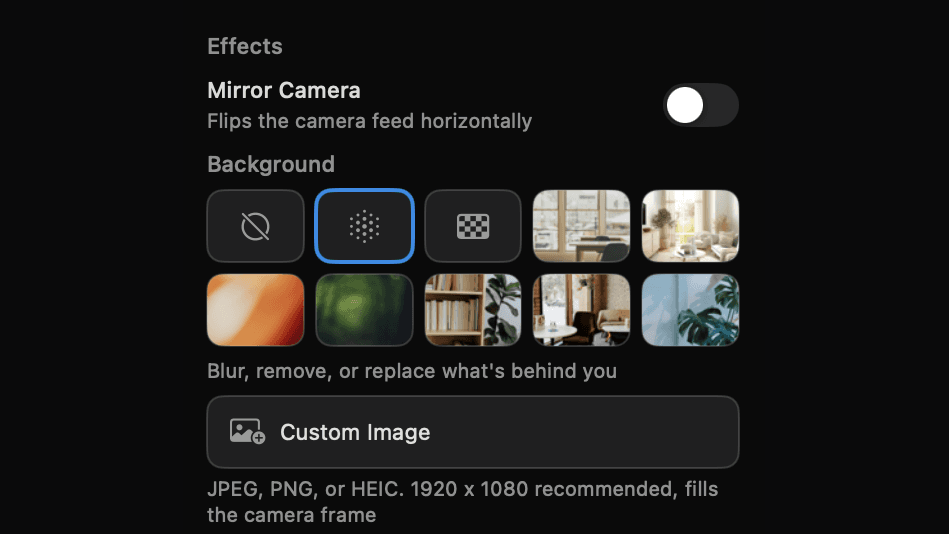
Screen Studio has no camera background feature of its own. Its help docs point you to macOS’s system-level Portrait Mode instead, a setting that lives outside the app, only blurs, and only works on Macs new enough to support it. Drishti’s Camera tab has its own picker: None, Blur, Transparent (removes the background entirely), seven preset photo backdrops, or a Custom Image button that fills the camera frame with your own JPEG, PNG, or HEIC. It runs inside the app itself, so it works the same way no matter which Mac you are recording on.
Mask track: three ways to hide something, not just one
Screen Studio’s mask tool covers a region with a blur, and you can add more than one across a recording, drag a rectangle over an email or a customer name and repeat for a second region. That much is table stakes now, both apps do it. Where they part ways is style: Screen Studio’s mask is blur or nothing. Drishti’s Mask track gives you three treatments per region. Blur softens the content underneath. Pixelate drops in classic redaction blocks, the strongest hide for text. Highlight does the opposite of hiding, it brightens the region and dims the rest of the frame to draw attention to it. Blur and Pixelate cut on and off instantly rather than fading, since a fading blur would leak the secret for the length of the fade. Every region is drawn straight on the preview and anchored to the source recording, so it holds its position even if you change the export aspect ratio to 9:16 or 1:1, or switch the camera into a side-by-side layout, afterward.
FocuSee: the cross-platform take on auto-zoom
FocuSee (by iMobie) applies the same idea, auto-zoom on clicks with cursor animation, and it runs on both Windows and macOS, which makes it the practical answer for mixed teams asking for a Screen Studio for Windows. As of September 2026 it is $49.99 a year for Standard on one computer, $79.99 a year for Advanced with AI features and credits, or $199.99 one time for a lifetime license of the 2.x versions on up to 5 computers, with a free trial that exports one video at up to 4K. Choose it for the Windows seats. On the Mac seats, Drishti is a third of FocuSee’s lifetime price and native.
Cap: open source with a real editor
Cap is open source, with native apps for macOS (Apple Silicon and Intel) and Windows. Its Studio Mode ships a full editor, and the pricing is friendly: free for personal use, $29 a year for commercial work, Pro from $8.16 a month billed annually for cloud sharing and AI summaries. It is the strongest pick here if open source is a requirement. Its polish layer is not automatic like Screen Studio’s or Drishti’s, so budget editing time per video, every video.
Tella: polish through editing, not automation
Tella gets to a polished result a different way: record in clips, arrange them, style backgrounds and layouts, publish. It is web-first, with native macOS and Windows recorders on paid plans. Pro is $13 a month with unlimited videos, 4K export, and 106-language transcription; Premium at $19 removes Tella branding and adds 60fps, with both rates billed annually. Choose it if you enjoy making editing decisions. If the whole reason you liked Screen Studio was NOT making them, Drishti keeps that promise and Tella does not try to.
CleanShot X: $29 covers the simple cases
Not every recording needs cinema. CleanShot X records MP4 and GIF with microphone and computer audio, camera overlay, and click and keystroke capture, then trims in a built-in editor. $29 one time with a year of updates, macOS only. If most of your Screen Studio use was short feature clips, this is a rational downgrade that saves you $108 a year. The day a recording needs to impress someone, the top of this page is where you come back to.
OBS Studio: free if you bring the effort
OBS Studio is free, open source, and runs on macOS 12+, Windows, and Linux. It captures beautifully and applies zero polish: no zoom, no captions without plugins, no editor. Pairing OBS with a video editor can approximate the Screen Studio look for free, at the cost of your evenings. That trade makes sense at budget zero. At any budget above it, $79 once buys those evenings back.
The shortlist, side by side
| Tool | Platform | Pricing (September 2026) | One-time option |
|---|---|---|---|
| Drishti Studio (our pick) | macOS 15+ | $9/mo, $49/yr, or $79 lifetime | Yes, $79 |
| FocuSee | macOS, Windows | $49.99/yr, $79.99/yr, or $199.99 lifetime | Yes, $199.99 |
| Cap | macOS, Windows | Free personal; $29/yr commercial; Pro from $8.16/mo | No |
| Tella | Web, macOS, Windows | Pro $13/mo, Premium $19/mo, billed annually | No |
| CleanShot X | macOS | $29 one time, 1 year of updates | Yes, $29 |
| OBS Studio | macOS, Windows, Linux | Free, open source | Free |
Where Screen Studio still wins
An honest list, because a recommendation you cannot argue with is not worth much:
- Shareable links are included with the subscription, so publishing a clip is one step
- Its motion aesthetic is the reference point this whole category copies, and taste is legitimate
- A mature preset and template ecosystem from years as the category leader
- If you bought a legacy one-time license back when it sold them, keeping it costs nothing
The bottom line
Screen Studio proved people will pay for recordings that look edited. The question in 2026 is whether that should cost $108 a year or $79 once, and whether you also want a side-by-side camera layout, a background picker built into the app, and a mask tool with more than one style along the way. Drishti’s answer includes all three, plus captions and vertical export Screen Studio does not have, in a native app a tenth the size. Both have trials. Record the same two minutes in each and compare the exports; ours is the one with nothing left to renew.
Sources
Competitor facts last checked September 30, 2026.
- Screen Studio pricing (monthly and yearly plans, no free tier)
- Screen Studio download (v3.7.5 Apple Silicon disk image, 365.6 MB)
- Screen Studio guide: aspect ratios (16:9, 9:16, 1:1, 4:3, 3:4)
- Screen Studio guide: captions (AI captions, no word highlighting)
- Screen Studio guide: masks (blur) and highlights
- Screen Studio guide: camera layouts (fullscreen or default, no side-by-side)
Frequently asked questions
Is Screen Studio subscription-only now?
Yes. As of September 2026 its pricing page lists $29 a month, or $9 a month billed yearly, all features included. It sold one-time licenses in the past, and its FAQ still references those legacy purchases, but new buyers subscribe. If you want this category with a one-time price, that is Drishti Studio at $79 or FocuSee at $199.99.
Is there a Screen Studio for Windows?
Screen Studio itself is macOS only. For the auto-zoom style on Windows, FocuSee runs on both Windows and macOS from $49.99 a year or $199.99 lifetime. Cap is also cross-platform and open source, with a lighter polish layer. On Macs, Drishti Studio is the native pick.
What is the cheapest way to get the auto-zoom look?
Among the auto-zoom recorders compared here, Drishti Studio at $79 lifetime is the cheapest to own outright, with captions and 9:16 export included. FocuSee’s lifetime is $199.99. Against Screen Studio’s $108 a year, Drishti costs less than nine months of subscription, once.
Does Drishti Studio actually match the Screen Studio look?
The core effect is the same family: automatic zoom into click targets with smooth cursor-following pans. Drishti generates those zooms as keyframes from your recorded clicks via Smart Animate, nothing placed by hand, and adds karaoke captions and one-click vertical export that Screen Studio does not have. Both have trials: run your own footage through each and compare.
Does Screen Studio have a side-by-side camera layout?
No, not as of September 2026. Screen Studio’s Dynamic Camera Layouts let you set the selfie camera to fullscreen, hidden, or the default overlay bubble during a recording, but the camera and the screen never share the frame as two columns. Drishti’s Camera Left and Camera Right layouts do exactly that, with the trade-off that side-by-side turns off Auto Zoom for that recording.
Does Screen Studio have a built-in camera background picker?
No. Screen Studio’s own documentation points you to macOS’s system-level Portrait Mode for camera background blur, which only works on supported Macs and lives outside the app. Drishti’s background picker, None, Blur, Transparent, seven presets, or a custom image, is built into the Camera tab and works the same way on any Mac Drishti supports.
Can Drishti’s mask tool hide more than one thing at a time?
Yes, mask regions can overlap and stack in the same timeline lane, so you can cover two or three sensitive areas in the same stretch of a recording. Screen Studio also supports adding multiple blur regions, that part is parity between the two apps. Where Drishti differs is style: Blur, Pixelate, or Highlight per region, against Screen Studio’s blur-only mask.
Why does app size and architecture matter for a recorder?
Rendering is the bottleneck. Screen Studio is an Electron app of roughly 365 MB, and long exports carry that web-layer overhead. Drishti is native Swift with Metal GPU rendering at under 30 MB, which keeps 20-30+ minute exports fast. For 2-minute clips either is fine; for long tutorials the difference is real time.
Keep reading
Try it on your next recording
14-day free trial. Then $9/month, $49/year, or $79 once for Lifetime.