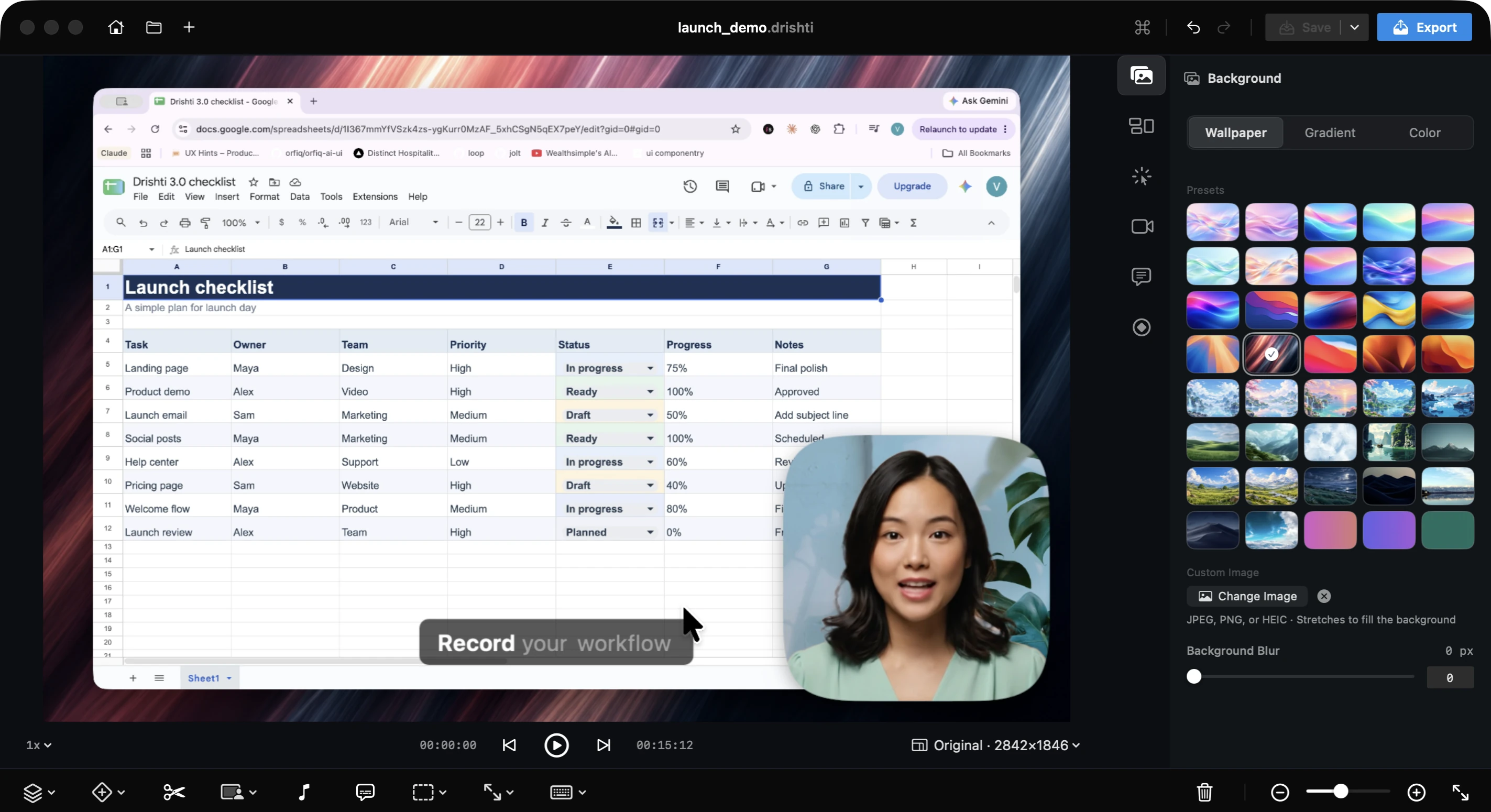
Your camera, on your cue
Drop cues on the timeline to switch between Camera Only, Bubble, Split and Screen Only at any point. The recording underneath stays untouched.
macOS screen recorder with auto-zoom and captions built in. Your demos and tutorials look professionally edited in minutes, not hours.
Drop cues on the timeline to switch between Camera Only, Bubble, Split and Screen Only at any point. The recording underneath stays untouched.
Turn any recording vertical without recording it again. Pick 9:16 from the editor's aspect menu, then choose Split, Bubble or Presenter for Shorts, Reels, and TikTok.
Give your camera its own column, float it in a bubble, or stand in front of your screen as a presenter. Change your mind long after the recording is done.
No re-record, no export to another editor. Cut a fumbled line in two clicks.
Drishti closes the gap and keeps your captions in step.
Read your take like a script, fix a typo, and hit Cut next to the line you fumbled. It becomes its own clip, ready to go.
Click where the slip starts, click where it ends, delete the piece. Voilà! It's done.
Clear the desktop. Keep private details private. Bring your words, clicks, and shortcuts into focus. Then choose how you show up.
Blur it, remove it, or swap in a new scene or your own photo. No green screen, no extra apps.
Hide the icons while you record. Everything comes back when you’re done.
Blur the private bits, pixelate a detail, or spotlight what matters.
Our own cursor sets, smoother motion, and clicks that stand out.
Your shortcuts, right on screen. Walkthroughs that click.
Karaoke captions that highlight your words as you say them. Automatically.
Drop in a whoosh, a click, a music track or your own voiceover. Layer as many as you like, trim each one, set its volume and fade it out.
Whether you are showing a design, building in public, or explaining a bug.
No Drishti cloud. Your recordings and projects stay on your Mac. Drishti only checks in for license and updates.
Drishti Studio is a native macOS app. It feels familiar from the first click, and leans on what macOS already does well.



Apple silicon and Intel. One app runs natively on M-series and Intel Macs with macOS 15 or later.
Performance. Drishti Studio records with ScreenCaptureKit, Apple's own capture framework, so it stays smooth even on big displays.
GPU rendering. Zooms, backgrounds and effects are drawn with Metal on your Mac's GPU, and exports use its built-in video encoder.
Choose a plan to unlock every video export option. Every recording and editing feature is free.
Unlimited exports, paid month to month.
Billed monthly. Switch to yearly anytime.
Unlimited exports at the lowest monthly price.
Billed $59 per year. Cancel anytime.
Pay once and keep every future update.
One payment. Every future update included.
Prices in USD · Local currency at checkout
Buying for a team or a classroom? Write to team@drishtistudio.app
Here’s what people say after recording with Drishti.
Abhinav Singh@Abbylester
Co-founder, Avinya Labs
Been using DrishtiStudio with my team at Avinya Labs and honestly, this has become one of those tools we just keep opening every day. 😂 We use it for pretty much everything: 🎥 Record screens ✂️ Edit demos 🤝 Send videos to clients 🚀 Share product releases 💬 Explain things to the team 🔥 Make launches feel less boring And now you can blur/highlight/pixelate parts of the screen and the mask stays in place even when you change the aspect ratio. Such a small feature, but ridiculously useful.
Sep 2026
Rajat Patel
Founder, Molades
Tried it and bought the lifetime plan on Day 1. Kudos to a fellow designer turned builder 🚀
Apr 2026
Darshil@parmardarshil07
Data Engineer, YouTube (200K+)
Great, I recently started using drishtistudio.app It feels more lightweight, supports native Mac and is very fast
May 2026
Shweta Humnabadkar
Senior UX Designer, Salesforce
You have solved for one of the pain points of every designer who needs to create demo videos. I’d love to try this one out.
Apr 2026
MT@comm1ted0
Data Engineer
cutting multiple sections at once is the small feature i didn’t know i needed fr
Oct 2026
Akshay Raja
AVP & Head of CX, Finnable
This genuinely will save a lot of time in creating dashboard walkthrough and demos!
Apr 2026
Ajay Soni@techo_aj
UI/UX Designer
I think this is the one, which I was looking for.
May 2026